





If you want to build a professional website without coding, Webflow pricing is one of the most important factors to understand before getting started. Webflow combines powerful website design, CMS, hosting, and SEO tools in a single platform, making it one of the most popular website builders today.
However, many beginners ask an important question:
How much does Webflow cost?
Understanding Webflow pricing is essential before starting your website. The platform offers multiple plans designed for different users such as beginners, freelancers, agencies, students, and ecommerce store owners.
Therefore, this guide explains Webflow pricing, Webflow hosting pricing, ecommerce plans, freelancer plans, and UK pricing in detail. In addition, we will compare each plan so you can choose the best option.
Webflow Pricing Overview
Webflow divides its pricing into two main categories:
- Site Plans
- Workspace Plans
Each category serves a different purpose.
| Plan Type | Best For |
|---|---|
| Site Plans | Individual websites |
| Workspace Plans | Teams, freelancers, agencies |
| Ecommerce Plans | Online stores |
Because of this structure, Webflow is flexible for both individual creators and professional developers.
Webflow Free Plan (Best for Free Portfolio Sites)
One of the biggest advantages of Webflow is its free plan.
Many designers use this plan to create free portfolio sites before upgrading.
Features of Free Plan
- Webflow.io subdomain
- Basic design tools
- Webflow templates access
- CMS testing
- Limited hosting
However, the free plan has several limitations. For example, you cannot connect a custom domain.
Therefore, it is mainly useful for students, beginners, and portfolio testing.
Webflow Site Plans Pricing
If you want to publish a real website with a custom domain, you must choose a Site Plan.
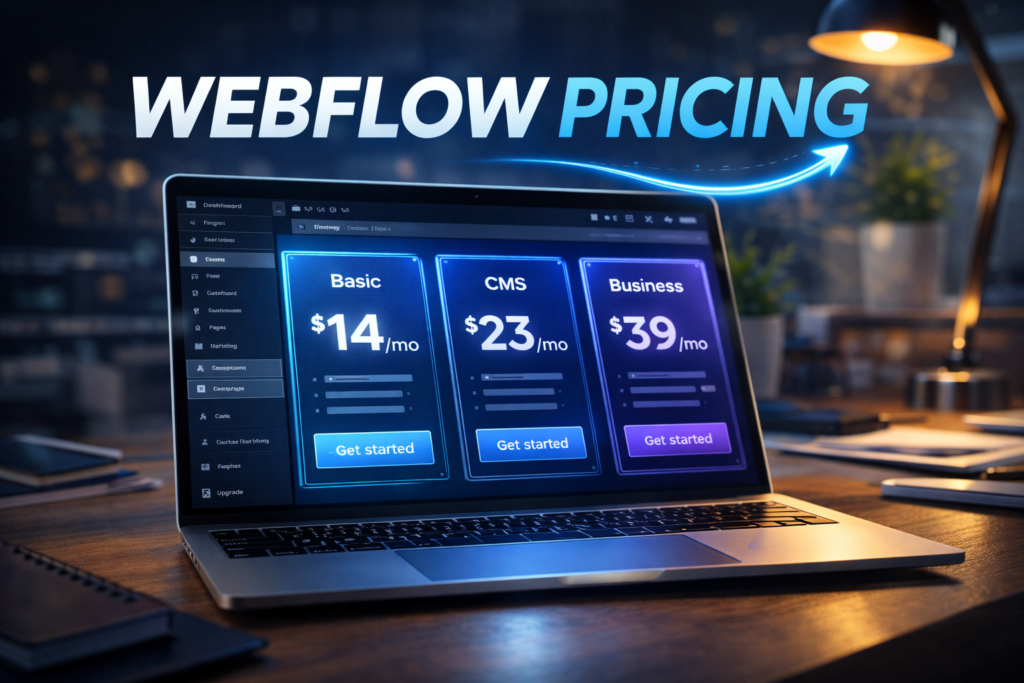
1. Basic Plan
Best for simple websites.
Price: $14/month (billed yearly)
Features:
- Custom domain
- Webflow hosting
- 50 GB bandwidth
- Basic SEO controls
This plan works well for landing pages or small business websites.
2. CMS Plan
Price: $23/month
Best for:
- Blogs
- Content websites
- Magazine style sites
Key features include:
- CMS collections
- Dynamic content
- 2000 CMS items
- Advanced SEO tools
Many bloggers choose this plan because it allows dynamic content management.
3. Business Plan
Price: $39/month
Best for:
- High traffic websites
- Companies
- marketing websites
Features:
- 10,000 CMS items
- 400GB bandwidth
- Advanced analytics support
- Form submissions
As a result, larger websites often prefer this plan.
Webflow Ecommerce Pricing
If you want to build an online store, Webflow offers special ecommerce plans.
1. Standard Plan
Price: $29/month
Features:
- 500 products
- Ecommerce checkout
- Payment gateway integration
2. Plus Plan
Price: $74/month
Features:
- 1000 products
- Advanced ecommerce tools
- No transaction fees
3. Advanced Plan
Price: $212/month
Features:
- 3000 products
- Full ecommerce functionality
- Advanced integrations
Because of these features, many modern stores prefer Webflow ecommerce pricing over traditional platforms.
Webflow Hosting Pricing
Webflow includes managed hosting in all site plans.
Hosting features include:
- Global CDN
- SSL security
- Automatic backups
- fast page speed
The platform uses enterprise-level infrastructure similar to modern cloud systems.
Therefore, Webflow hosting pricing is slightly higher compared to basic shared hosting. However, the performance and security are significantly better.
Webflow Workspace Plans
Workspace plans are designed for freelancers, agencies, and teams.
Freelancer Plan
The Webflow freelancer plan is popular among designers and developers.
Features include:
- Multiple projects
- Client billing
- team collaboration
- staging websites
Because of these features, freelancers can manage multiple client websites easily.
Webflow Pricing for Freelancers
Freelancers often ask:
How much does Webflow cost for freelancers?
The typical setup looks like this:
- Workspace Freelancer Plan
- Site Plan for each client
Example:
Freelancer workspace = $16/month
Client site plan = $23/month
Therefore, freelancers charge clients design + hosting fees.
This business model makes Webflow very attractive for web designers.
Webflow Pricing for Students
Students can access discounted Webflow plans.
Benefits include:
- Free learning access
- discounted site plans
- education resources
Many universities also use Webflow to teach modern web design without coding.
Because of this, Webflow pricing for students is significantly more affordable.
Webflow Pricing UK
Users in the United Kingdom often search for Webflow pricing UK.
However, Webflow pricing remains the same globally because it is billed in USD.
Typical UK conversion:
| Plan | Approx UK Price |
|---|---|
| Basic | £11/month |
| CMS | £18/month |
| Business | £30/month |
Therefore, UK users pay similar prices after currency conversion.
Webflow Templates
Webflow provides thousands of professional Webflow templates.
Templates can cost between:
- Free
- $49
- $79
- $129
These templates help beginners launch websites quickly.
Additionally, many designers sell premium templates in the Webflow marketplace.
Webflow Pricing Calculator
Before selecting a plan, many users use a Webflow pricing calculator.
A calculator estimates costs based on:
- number of websites
- hosting plan
- ecommerce products
- workspace users
Because pricing varies depending on project size, a calculator helps determine the exact budget.
Webflow Optimize Pricing
Webflow also introduced Webflow Optimize, which focuses on conversion optimization.
Features include:
- A/B testing
- personalization
- analytics tracking
Optimize pricing depends on traffic and website size.
However, it is typically used by large businesses and marketing teams
Webflow Pricing Reddit Discussions
Many users research Webflow pricing Reddit discussions before purchasing.
Common opinions from the community include:
Pros:
- powerful design tools
- fast hosting
- modern CMS
Cons:
- higher pricing than basic builders
- learning curve for beginners
Nevertheless, most professional designers consider Webflow worth the cost.
Webflow Login and Getting Started
To start using Webflow:
- Visit Webflow website
- Create an account
- Use the Webflow login page
- Choose a template or start designing
After logging in, users can build websites using a visual drag-and-drop editor.
Webflow vs Other Website Builders
Compared with platforms like:
- WordPress
- Wix
- Shopify
Webflow offers more design control and cleaner code.
However, beginners may find it slightly more complex.
Therefore, Webflow is often preferred by designers and developers.
Pros of Webflow Pricing
- All-in-one platform
- fast hosting included
- professional design tools
- strong CMS functionality
- scalable ecommerce features
Because of these benefits, Webflow has become a popular platform for modern websites.
Cons of Webflow Pricing
Despite its strengths, there are a few disadvantages.
- Higher price than simple builders
- Learning curve for beginners
- advanced features require higher plans
Nevertheless, most professional users consider the value worthwhile.
Is Webflow Worth the Price?
Yes, Webflow is worth the price for:
- freelancers
- agencies
- professional designers
- businesses
Because it combines design, development, hosting, and CMS in one platform.
As a result, many modern websites now use Webflow instead of traditional builders.
Conclusion
Understanding Webflow pricing helps you choose the right plan for your website.
The platform offers flexible options including:
- free portfolio sites
- CMS plans for blogs
- ecommerce plans for stores
- freelancer workspace plans
Therefore, whether you are a beginner, freelancer, or business owner, Webflow provides scalable solutions.
If you want full design control, fast hosting, and professional website tools, Webflow remains one of the best platforms available today.