





Managing personal finances can be difficult without the right tools. Many people struggle to track spending, organize bills, and manage investments. Because of this, financial management software has become extremely popular.One of the most trusted tools in this category is Quicken software. It has helped millions of users organize their finances, track expenses, and plan budgets effectively.
In this complete guide, you will learn everything about Quicken including features, cost, download options, Quicken Simplifi, login process, and how it compares with other financial tools.
What Is Quicken Software?
Quicken is a powerful personal finance software designed to help users manage money efficiently. It connects with bank accounts, credit cards, and investments so users can see their complete financial picture in one place.
Originally launched in 1983, Quicken has evolved into a modern financial management platform available for both Windows and Mac users.
People commonly use Quicken software for:
- Budget tracking
- Expense management
- Investment monitoring
- Bill reminders
- Financial reporting
Therefore, individuals who want better control over their finances often rely on Quicken as a complete financial solution.
What Is Quicken Software Used For?
Quicken software offers several powerful financial management tools. As a result, users can simplify complex financial tasks and gain better control over their money.
1. Budget Management
First, Quicken allows users to create a monthly budget. It automatically categorizes expenses, making it easier to see where money is going.
Because of this feature, users can identify unnecessary spending and improve their financial habits.
2. Expense Tracking
Another useful feature is expense tracking. Quicken connects to your bank accounts and automatically imports transactions.
Consequently, users do not need to manually enter every purchase.
3. Bill Management
In addition, Quicken helps manage bills and recurring payments. It sends reminders before due dates so users never miss a payment.
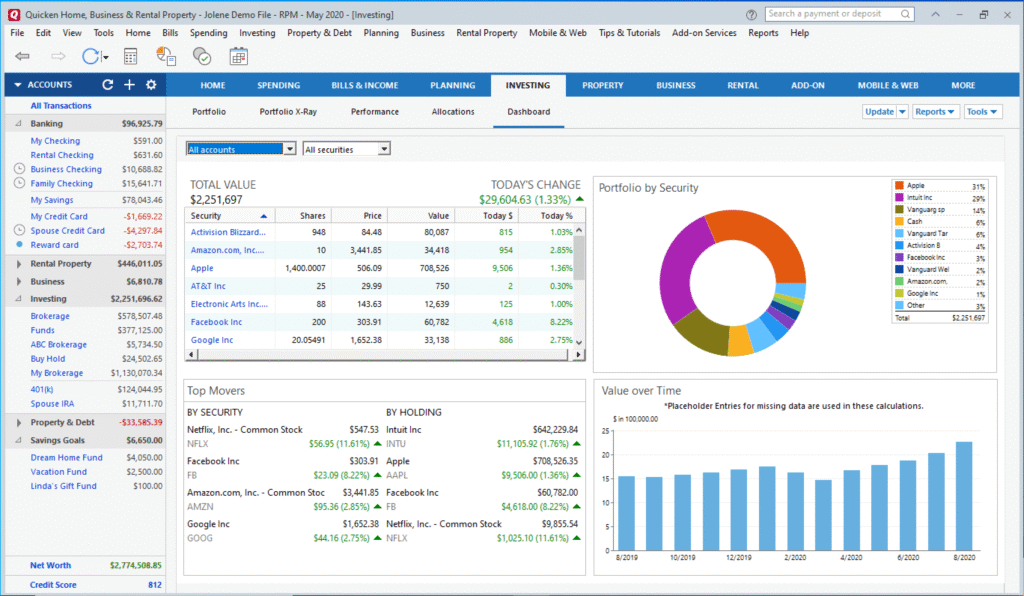
4. Investment Tracking
Quicken also supports investment management. Users can monitor stocks, retirement funds, and portfolio performance.
This makes it easier to track long-term financial growth.
5. Financial Reports
Finally, Quicken generates detailed financial reports. These reports help users analyze spending patterns and make smarter financial decisions.
Quicken Software for PC
Many users prefer Quicken software for PC because it provides powerful desktop financial management tools.
The Windows version offers advanced features such as:
- Investment tracking
- Rental property management
- Tax reports
- Custom financial reports
Additionally, the PC version supports integration with thousands of financial institutions.
Because of these capabilities, it remains one of the most popular personal finance tools for Windows users.
Quicken Software for Mac
For Apple users, Quicken software for Mac provides a clean and modern interface designed specifically for macOS.
Although earlier versions were limited, the latest Quicken Mac edition includes many powerful features.
These features include:
- Budget planning
- Transaction syncing
- Bill tracking
- Investment monitoring
- Financial reports
As a result, Mac users can now enjoy a complete financial management experience.
Quicken Software for Windows 11
The latest version of Quicken software for Windows 11 is fully optimized for modern systems.
It works smoothly with Windows 11 and supports:
- automatic bank syncing
- faster transaction updates
- improved security
- better reporting tools
Because of these improvements, many users upgrade to the newest version for better performance.
Quicken Software Download Guide
If you want to start using Quicken, the installation process is simple.
Follow these steps to complete the Quicken software download.
Step 1: Visit the Official Website
First, go to the official Quicken website.
Step 2: Choose Your Version
Next, select either:
- Windows version
- Mac version
Step 3: Purchase or Subscribe
Then choose a suitable plan.
Step 4: Download the Installer
After purchase, download the installer file.
Step 5: Install the Software
Finally, run the installer and follow the instructions.
Once installed, you can connect your bank accounts and start managing finances.
Quicken Login Guide
To access your financial data, you must complete the Quicken login process.
Steps include:
- Open Quicken software
- Enter your Quicken ID
- Enter your password
- Click login
After logging in, the software syncs your accounts and updates transactions automatically.
Quicken Software Cost
One common question users ask is about the Quicken software cost.
Quicken uses a yearly subscription model. Prices may vary depending on the version.
Typical pricing includes:
| Plan | Estimated Price |
|---|---|
| Starter | $35 – $50/year |
| Deluxe | $50 – $70/year |
| Premier | $80 – $100/year |
| Home & Business | $100 – $130/year |
Higher plans include investment tracking and business features.
Therefore, users can select the plan that fits their financial needs.
Is Quicken Software Free?
Many people search for Quicken software free versions. However, Quicken does not offer a permanent free version.
Instead, it provides:
- Free trial periods
- Limited promotional offers
Although the trial helps users test the software, full access requires a subscription.
Quicken Software Without Subscription
Some users prefer Quicken software without subscription. In earlier years, Quicken offered lifetime desktop versions.
However, the company now uses a subscription model. This change ensures regular updates, security improvements, and cloud syncing.
As a result, most modern versions require annual renewal.
Quicken Classic
Quicken Classic refers to the traditional desktop version of Quicken.
It focuses on:
- offline financial management
- detailed budgeting
- investment tracking
- local data storage
Many long-time users still prefer Quicken Classic because it provides deeper financial control.
Quicken Simplifi
Another modern product is Quicken Simplifi.
Unlike traditional Quicken software, Simplifi is a cloud-based budgeting app designed for simplicity.
Key features include:
- automatic expense tracking
- real-time budget updates
- savings goals
- subscription tracking
Because of its simplicity, Simplifi is popular among younger users.
Quicken Simplifi Login
Users who choose Simplifi can access their accounts through the Quicken Simplifi login page.
Steps include:
- Visit Simplifi dashboard
- Enter your email
- Enter password
- Access your financial dashboard
Since Simplifi is cloud-based, users can access their data from any device.
Quicken Online
Many users wonder whether Quicken online exists.
Today, Quicken provides cloud syncing that allows users to access financial data through mobile apps and web dashboards.
Although the full software still runs on desktop, online access makes financial tracking more convenient.
Quicken Software for Personal Use
Quicken is mainly designed for personal finance management.
Individuals commonly use it for:
- monthly budgeting
- expense tracking
- bill reminders
- savings goals
- retirement planning
Because of these capabilities, Quicken remains one of the best personal finance tools available.
Where to Buy Quicken Software
Users can purchase Quicken from several trusted sources.
Common places include:
- Official Quicken website
- Amazon
- Best Buy
- Walmart
- Software retailers
However, buying from the official website ensures you receive the latest version and updates.
Difference Between Quicken and QuickBooks
Many people confuse Quicken with QuickBooks. However, they serve different purposes.
| Feature | Quicken | QuickBooks |
|---|---|---|
| Purpose | Personal finance | Business accounting |
| Users | Individuals | Businesses |
| Complexity | Simple | Advanced |
| Accounting tools | Limited | Full accounting |
Therefore, individuals usually choose Quicken, while businesses rely on QuickBooks.
Is Quicken Better Than Excel?
Another common question is whether Quicken is better than Excel.
Both tools can track finances, but they work differently.
Excel advantages:
- Fully customizable
- No subscription required
Quicken advantages:
- automatic bank syncing
- built-in budgeting
- financial reports
- investment tracking
Because of automation, Quicken saves significant time compared to manual spreadsheets.
Budget Calculator and Financial Planning
Quicken also includes tools similar to a budget calculator.
These tools help users:
- calculate monthly spending
- plan savings goals
- track debt payments
- forecast future expenses
Consequently, users can create smarter financial strategies.
Quicken Software Development Pvt Ltd
Some people search for Quicken Software Development Pvt Ltd. However, Quicken is developed and maintained by the company Quicken Inc.
The company focuses on creating financial management tools that simplify money management for individuals and families.
Pros and Cons of Quicken Software
Advantages
- powerful budgeting tools
- automatic bank synchronization
- investment tracking
- detailed financial reports
- multiple platform support
Disadvantages
- subscription cost
- learning curve for beginners
- limited business accounting features
Even with these limitations, Quicken remains one of the most trusted finance tools.
Final Verdict
Quicken software continues to be one of the most reliable personal finance management tools available today. It helps users organize budgets, track expenses, monitor investments, and plan long-term financial goals.
Because of its powerful features, cross-platform support, and financial insights, Quicken remains a top choice for individuals who want complete control over their money.
Whether you use Quicken Classic, Quicken Simplifi, or the desktop version for Windows 11 or Mac, the software offers a comprehensive solution for modern financial management.